Codeigniter Tutorial: How To check Username/Email availablity using jQuery in Codeigniter?

This post is for CI lover who wants to learn Codeigniter. This script will show you how can we check live availability of username or email using Ajax in Codeigniter. Using this tutorial you can also understand how can we send a jQuery Ajax request to server living in CI.
read more
CodeIgniter Tutorial: Upload and Convert video to FLV using FFmpeg.
Today, I will show, how can we upload and convert a video file to flv using FFmpeg in CodeIgniter website. FFmpeg commands runs in Linux but in Window server we need to download FFmpeg.exe file from its site. Which we have to put in our site root folder. IF your server is Linux then you also need verify that your hosting server has FFmpeg installed or you need it to be installed. For checking FFmpeg availability print phpinfo() in any file and run this command on server where you will get PHP version and other server settings. Find FFmpeg on that window if it doesn’t found then it means server has no FFmpeg installed.
Here is uploading code of video file in CodeIgniter.
1 2 3 4 5 6 7 8 9 10 11 12 13 14 15 16 17 18 19 20 21 22 23 24 25 26 27 28 29 30 31 32 33 34 35 36 37 | $file = 'video_file'; $config['upload_path'] = './video_folder/'; $config['allowed_types'] = 'mov|mpeg|mp3|avi'; $config['max_size'] = '50000'; $config['max_width'] = ''; $config['max_height'] = ''; $this->upload->initialize($config); $this->load->library('upload', $config); if(!$this->upload->do_upload($file)) { // If there is any error $err_msgs .= 'Error in Uploading video '.$this->upload->display_errors().'<br />'; } else { $data=array('upload_data' => $this->upload->data()); $video_path = $data['upload_data']['file_name']; $directory_path = $data['upload_data']['file_path']; $directory_path_full = $data['upload_data']['full_path']; $file_name = $data['upload_data']['raw_name']; // ffmpeg command to convert video exec("ffmpeg -i ".$directory_path_full." ".$directory_path.$file_name.".flv"); // $file_name is same file name that is being uploaded but you can give your custom video name after converting So use something like myfile.flv. /// In the end update video name in DB $array = array( 'video' => $file_name.'.'.'flv', ); $this->db->set($array); $this->db->where('id',$id); // Table where you put video name $query = $this->db->update('user_videos'); } |
PHP Encrypt/Decrypt: Simple class to encrypt url data
Encryption is useful where critical data is being transferred in url. I have found a simple and secure encryption class with some changes to make it fit for new users. You can use it in Codeigniter websites as well. Just copy it in application/libraries directory and use it in other libraries style.
Here is the code for encryption class.
1 2 3 4 5 6 7 8 9 10 11 12 13 14 15 16 17 18 19 20 21 22 23 24 25 26 27 28 29 30 31 32 33 34 35 36 37 38 39 | class Encryption { var $skey = "SuPerEncKey2010"; // you can change it public function safe_b64encode($string) { $data = base64_encode($string); $data = str_replace(array('+','/','='),array('-','_',''),$data); return $data; } public function safe_b64decode($string) { $data = str_replace(array('-','_'),array('+','/'),$string); $mod4 = strlen($data) % 4; if ($mod4) { $data .= substr('====', $mod4); } return base64_decode($data); } public function encode($value){ if(!$value){return false;} $text = $value; $iv_size = mcrypt_get_iv_size(MCRYPT_RIJNDAEL_256, MCRYPT_MODE_ECB); $iv = mcrypt_create_iv($iv_size, MCRYPT_RAND); $crypttext = mcrypt_encrypt(MCRYPT_RIJNDAEL_256, $this->skey, $text, MCRYPT_MODE_ECB, $iv); return trim($this->safe_b64encode($crypttext)); } public function decode($value){ if(!$value){return false;} $crypttext = $this->safe_b64decode($value); $iv_size = mcrypt_get_iv_size(MCRYPT_RIJNDAEL_256, MCRYPT_MODE_ECB); $iv = mcrypt_create_iv($iv_size, MCRYPT_RAND); $decrypttext = mcrypt_decrypt(MCRYPT_RIJNDAEL_256, $this->skey, $crypttext, MCRYPT_MODE_ECB, $iv); return trim($decrypttext); } } |
You need to include this class any where in to make your data encrypted with simple encode() or decode() functions.
If you are using it in Codeigniter then use like this
1 2 | $this->encrypt->encode('Your data'); $this->encrypt->decode('Your encrypted data'); |
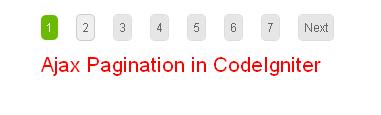
CodeIgniter Tutorial: How to Create Ajax Pagination using CodeIgniter?
CodeIgniter has many built-in classes and plugins. Pagination class of CodeIgniter is very easy and simple to use. Also Ajax Pagination library is availanle in Codeigniter. Here i will describe how to create simple ajax pagination in Codeigniter using some simple steps.
How can We Integrate the Authorize.Net Payment Gateway in Codeigniter?
Authorize.Net is my favorite payment mode for using in web development. It is simple, easy and secure payment connection. I use authorize.Net in my codeigniter based projects and here is the code and downloads.
Who I Am

Zeeshan Rasool
Software Engineer - PHP
Lahore - Pakistan
zeeshan(@)99points.info
Skype: zeeshan-rasool
gTalk: zishan.rasool85
Categories
- AJAX (37)
- Codeigniter (16)
- CSS (16)
- Facebook (11)
- Joomla (1)
- JQuery (53)
- Miscellaneous (4)
- Mootools (1)
- MySQL (6)
- PHP (60)
- SEO (2)
- Technology (6)
- Tutorials (15)
- Twitter (2)
- Web Design (23)
- Web Development (57)
- WordPress (2)
Tags
Comments
- ZeeShaN on Facebook Wall Script Clone with JQuery and PHP: Personal Project BETA Version 2.0
- 20 + Fresh jQuery Image Gallery/Slider Plugins and Tutorials Worth a Look | free on JQuery Based Flipped Image Gallery with Bounce Effects
- 20 + Fresh jQuery Image Gallery/Slider Plugins and Tutorials Worth a Look | free on Fresh JQuery Image Gallery with Captions and Auto Play/Pause Rotation
- 25 Cool and Helpful jQuery Plugins/Tutorials For Your Next Project | free on jQuery Tutorial: Create jQuery and CSS based Awesome navigation.
- 25 Cool and Helpful jQuery Plugins/Tutorials For Your Next Project | free on Ajax Tutorial: How to Create Ajax Search Using PHP jQuery and MYSQL
ZeeShaN